What is OPC UA and Why Should We Care? #
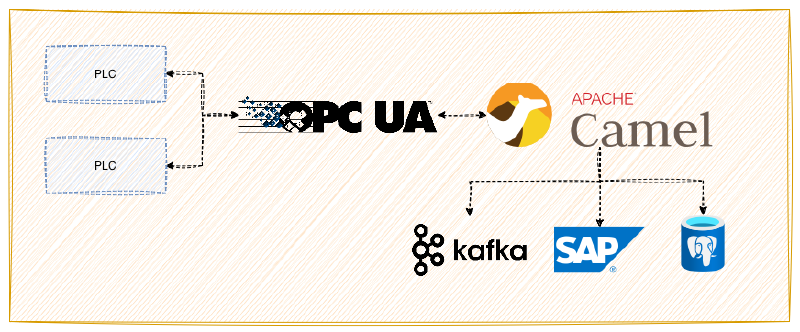
High-level architecture of data flow from PLCs to Enterprise Systems via Apache Camel.
Have you ever heard of OPC UA? Although I have been working with integration layers for many years, I had never heard of this technology until last year. To summarize about OPC UA, we can say basically it’s a standardized, secure and semantic data exchange protocol for machines, PLCs and sensors. Most manufacturers use this protocol in their PLCs and sensors. Of course, industrial systems can communicate using other protocols like Modbus, S7, ADS etc.
I wanted to write this blog because IoT is very important today, and I want to show how to communicate with OPC UA with Apache Camel and how to use it for integration without any paid-solution.
Bridging the Gap: My Journey with Apache Camel and PLC4X #
I was working on an integration platform project in my former company. Last year, a client reached us and asked “how we can integrate OPC UA connectivity in the platform?”. We were not sure about the protocol because we had never used before in any client projects. Then we discussed internally and we decided to use PLC4X. Of course, we encountered many problems with OPC UA because those PLCs were using security features of OPC UA. After some research I integrated this protocol into integration platform and finally we could use this protocol in the real world.
In this blog I will focus on how to configure a route with Apache Camel PLC4X component and how to use this component to connect OPC UA Server with Apache Camel. Also I am going to show some security features of OPC UA.
Prerequisites #
- OPC UA Server (In this blog I’ll use the Prosys OPC UA Simulation Server)
- Apache Camel project
- Java 17+
- Maven
This project based on the following pom.xml file.
<?xml version="1.0" encoding="UTF-8"?>
<project xmlns="http://maven.apache.org/POM/4.0.0" xmlns:xsi="http://www.w3.org/2001/XMLSchema-instance"
         xsi:schemaLocation="http://maven.apache.org/POM/4.0.0 http://maven.apache.org/maven-v4_0_0.xsd">
    <modelVersion>4.0.0</modelVersion>
    <groupId>io.rsg.apache.camel.learn</groupId>
    <artifactId>apache-camel-opcua-connectivity</artifactId>
    <packaging>jar</packaging>
    <version>1.0.0-SNAPSHOT</version>

    <name>Apache Camel OPC UA Example</name>

    <properties>
        <project.build.sourceEncoding>UTF-8</project.build.sourceEncoding>
        <project.reporting.outputEncoding>UTF-8</project.reporting.outputEncoding>
        <log4j2-version>2.25.3</log4j2-version>
        <camel.version>4.17.0</camel.version>
        <maven.compiler.release>17</maven.compiler.release>
    </properties>

    <dependencyManagement>
        <dependencies>
            <!-- Camel BOM -->
            <dependency>
                <groupId>org.apache.camel</groupId>
                <artifactId>camel-bom</artifactId>
                <version>${camel.version}</version>
                <scope>import</scope>
                <type>pom</type>
            </dependency>
        </dependencies>
    </dependencyManagement>
    <dependencies>
        <dependency>
            <groupId>org.apache.camel</groupId>
            <artifactId>camel-core</artifactId>
            <version>${camel.version}</version>
        </dependency>
        <dependency>
            <groupId>org.apache.camel</groupId>
            <artifactId>camel-main</artifactId>
            <version>${camel.version}</version>
        </dependency>
        <dependency>
            <groupId>org.apache.camel</groupId>
            <artifactId>camel-plc4x</artifactId>
            <version>${camel.version}</version>
            <scope>compile</scope>
        </dependency>
        <!-- logging -->
        <dependency>
            <groupId>org.apache.logging.log4j</groupId>
            <artifactId>log4j-slf4j2-impl</artifactId>
            <version>${log4j2-version}</version>
            <scope>runtime</scope>
        </dependency>
        <dependency>
            <groupId>org.apache.logging.log4j</groupId>
            <artifactId>log4j-core</artifactId>
            <version>${log4j2-version}</version>
            <scope>runtime</scope>
        </dependency>
    </dependencies>

    <build>
        <defaultGoal>install</defaultGoal>
        <plugins>
            <plugin>
                <groupId>org.apache.maven.plugins</groupId>
                <artifactId>maven-compiler-plugin</artifactId>
                <version>3.10.1</version>
                <configuration>
                    <release>${maven.compiler.release}</release>
                </configuration>
            </plugin>
            <plugin>
                <groupId>org.apache.maven.plugins</groupId>
                <artifactId>maven-resources-plugin</artifactId>
                <version>3.2.0</version>
                <configuration>
                    <encoding>UTF-8</encoding>
                </configuration>
            </plugin>

            <plugin>
                <groupId>org.apache.camel</groupId>
                <artifactId>camel-maven-plugin</artifactId>
                <version>${camel.version}</version>
                <configuration>
                    <logClasspath>true</logClasspath>
                    <mainClass>io.rsg.apache.camel.learn.Main</mainClass>
                </configuration>
            </plugin>

        </plugins>
    </build>

</project>- Download and install https://prosysopc.com/products/opc-ua-simulation-server/ on your computer / server.
- Configure your Apache Camel project with PLC4X Component (https://camel.apache.org/components/next/plc4x-component.html)
- If you don’t have Apache Camel project yet, you can follow this link to build a example Apache Camel project. https://camel.apache.org/camel-core/getting-started/index.html#_generating_the_project
Project configuration #
After Prosys OPC UA server installation please open the app and configure camel.opcua.connection value in src/main/resources/application.properties with your unique OPC UA endpoint.
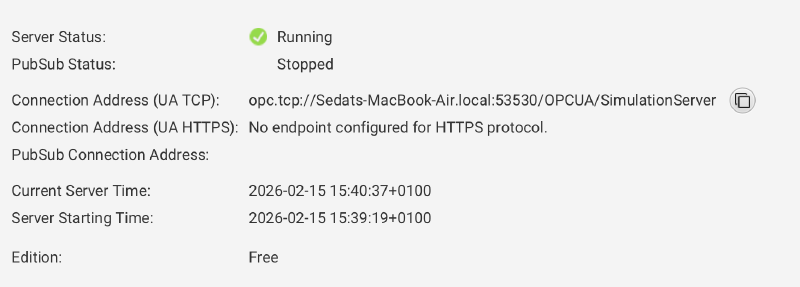
camel.opcua.connection=<your-prosys-opcua-server-connection>:53530/OPCUA/SimulationServerConsume data from OPC UA Server #
First, you have to know which NodeIds should be consume from OPC UA Server. If you don’t know NodeIDs namespaces or identifier, you can check with Prosys OPC UA Server application.
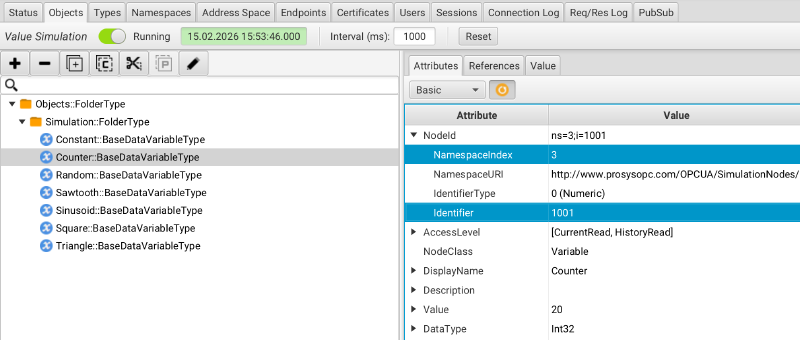
So, how can we define and use these values in a Camel Router?
Before to write a router for consumer, you need to define your NodeIds which you want to consume into a Map. Every NodeId has a NamespaceIndex and Identifier. I’ll use Random and Counter NodeIDs for this example;
| NodeId | Namespace | Identifier |
|---|---|---|
| Counter | ns=3 | i=1001 |
| Random | ns=3 | i=1002 |
package io.rsg.apache.camel.learn;

import org.apache.camel.builder.RouteBuilder;
import java.util.Map;

public class OPCUARouteBuilder extends RouteBuilder {

    //Define tags for OPC UA objects
    //ns={namespace-index};[s|i|g|b]={Identifier};a=attributeId;{Data Type}
    Map<String, String> opcuaConsumerTags = Map.of(
            "Random","ns=3;i=1002",
            "Counter","ns=3;i=1001");

    @Override
    public void configure(){

        //Bind OPCUA Tags object to current camel context.
        getCamelContext().getRegistry().bind("opcuaTags",opcuaConsumerTags);

        //Route 1 - Consume data from OPC UA Server.
        from("plc4x:opcua:tcp://{{camel.opcua.connection}}?tags=#opcuaTags")
            .routeId("opcua-consumer-route")
            .process(exchange -> {
                //Try to cast OPCUA server response to Map object
                Map<?, ?> response = exchange.getIn().getBody(Map.class);
                if(response != null){
                    log.info("OPCUA Server returned values with {} size. Random : {}, Counter: {}", response.size(), response.get("Random"),response.get("Counter"));
                }else{
                    log.warn("OPCUA Server did not return anything.");
                }
            }).end();
    }
}
After running this router, we will see the logs in the console.

Produce data to OPC UA Server #
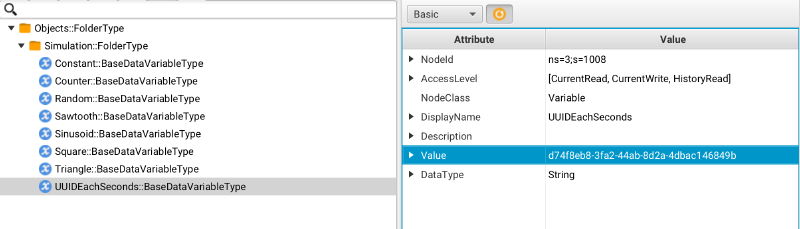
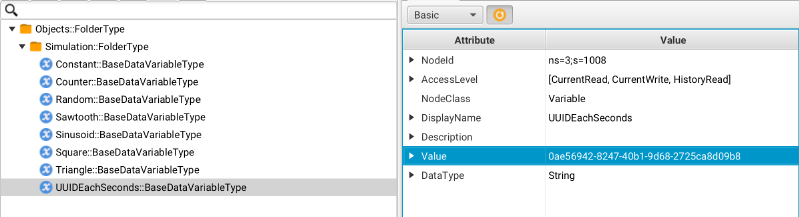
To produce data to OPC UA Server, you need at least one Variable. You can add an Variable under the Simulation folder in Objects tab. I will create a Variable with String data type.
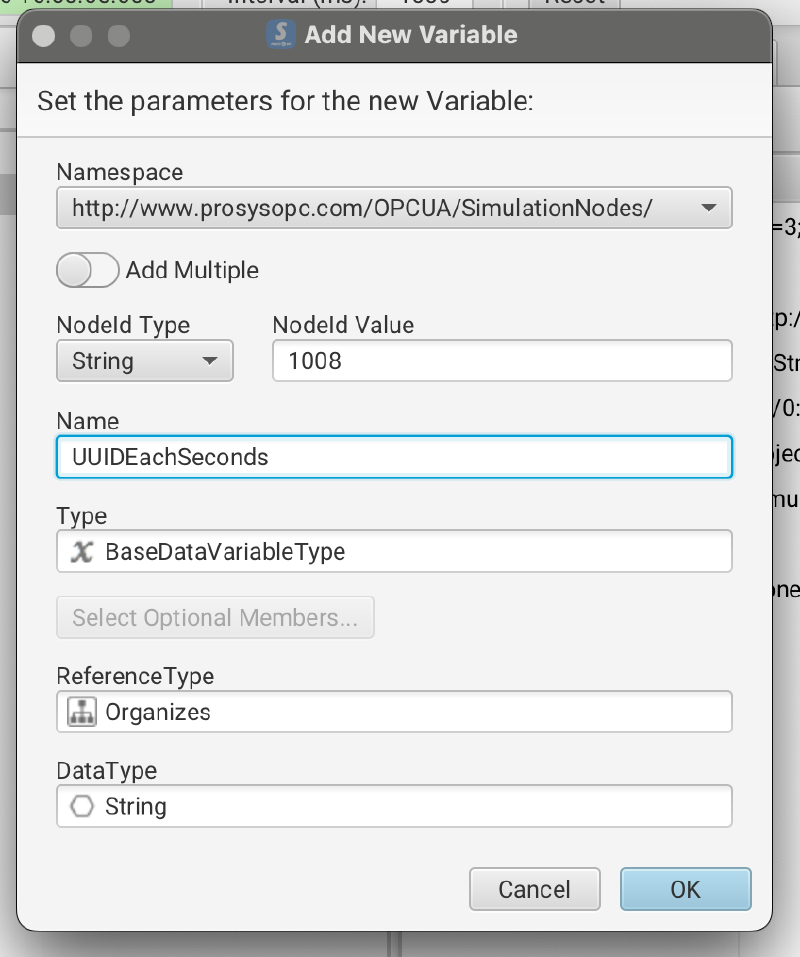
My main goal is set UUID to UUIDEachSeconds variable every second.
package io.rsg.apache.camel.learn;

import org.apache.camel.builder.RouteBuilder;

import java.util.Collections;
import java.util.HashMap;
import java.util.Map;
import java.util.UUID;

public class OPCUAProducerRouteBuilder extends RouteBuilder {

    @Override
    public void configure() {

        //Route 1 - Produce data to OPC UA Server
        from("timer://produceDataToOPCUA?fixedRate=true&period=1000")
            .routeId("opcua-producer-route")
            .process(exchange -> {
                    var uuid = UUID.randomUUID().toString(); //define a variable for UUID
                    //Define a HashMap for UUIDEachSeconds and set namespace and identifier of this variable and UUID value.
                    Map<String, Map<String, Object>> tags = new HashMap<>();
                    tags.put("UUIDEachSeconds", Collections.singletonMap("ns=3;s=1008", uuid));
                    // Change exchange body with defined map
                    exchange.getIn().setBody(tags);
                    log.info("Producer router is sending UUID to UUIDEachSeconds variable. UUID's value is : {}", uuid );

            })
            // Send body to OPC UA Server
            .to("plc4x:opcua:tcp://{{camel.opcua.connection}}")
            .end();
    }
}
You’ll see the logs when you run this router.

Logs are fine, but what is happening in OPC UA server? Let’s check it together!
Go Object views and select UUIDEachSeconds variable. You’ll see UUIDEachSeconds’s value is changing every second.
Security #
Before implementing security features we need a keystore for OPC UA. You can follow this blog for many cases : https://plc4x.incubator.apache.org/plc4x/pre-release/users/getting-started/opcua-client-certificate.html
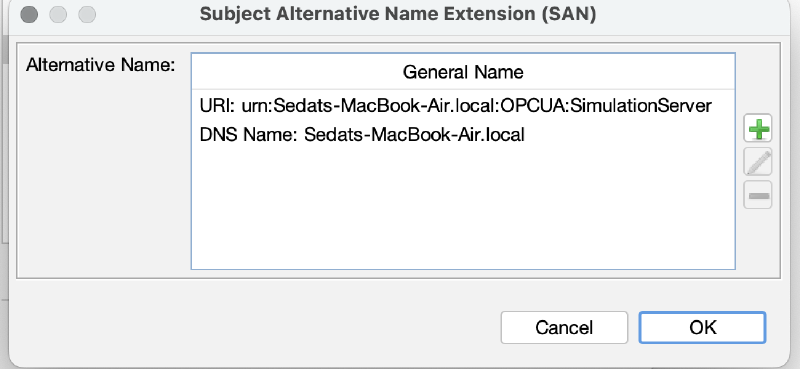
But when I tested keystore that I created with that blog, I faced some issues in the customer side. So, if you face any error with that blog, you can use this KeyStore explorer template to create Key Pair Add Extensions -> Load Template.
KeystoreExplorer template (CET)
Don’t forget to change Subject Alternative Name Extension.
Change your application.properties file with this values;
camel.opcua.connection.security-policy= Basic256Sha256
camel.opcua.connection.message-security= SIGN
camel.opcua.connection.key-store-file=keystore.p12
camel.opcua.connection.key-store-type=pkcs12
camel.opcua.connection.key-store-password=changeit
Detailed explaniation for those properties here : Apache PLC4X Connection String Options
Now we are ready to test security.
First, I want to disable None mode on the OPC UA server to test security.
- Navigate to Endpoints tab on the Prosys application. (If you don’t see that tab, you need to change your Mode from Basic to Expert. To change mode you can change easily with Options menu.)
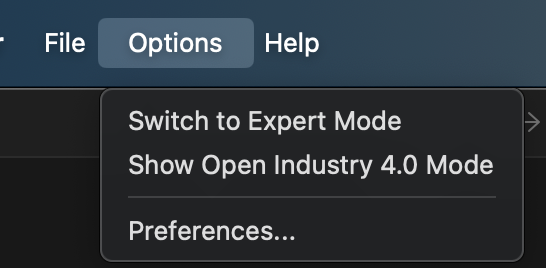
Change to expert mode - Disable None option on Secuirty Modes section.
After disabling the None option, you’ll see the Server returned error BadSecurityPolicyRejected error in your terminal when you run current consumer route.

To fix that error, we need to implement security features into endpoint definition.
package io.rsg.apache.camel.learn;

import org.apache.camel.builder.RouteBuilder;
import java.util.Map;

public class OPCUAConsumerSecuirtyRouteBuilder extends RouteBuilder {

    //Define tags for OPC UA objects
    //ns={namespace-index};[s|i|g|b]={Identifier};a=attributeId;{Data Type}
    Map<String, String> opcuaConsumerTags = Map.of(
            "Random", "ns=3;i=1002",
            "Counter", "ns=3;i=1001");

    @Override
    public void configure() {

        //Bind OPCUA Tags object to current camel context.
        getCamelContext().getRegistry().bind("opcuaTags", opcuaConsumerTags);

        //Route 2 - Consume data from OPC UA Server with Security
        from("plc4x:opcua:tcp://{{camel.opcua.connection}}?tags=#opcuaTags" +
                "&security-policy={{camel.opcua.connection.security-policy}}" + // Security policy. Possible values : NONE, Basic128Rsa15, Basic256, Basic256Sha256, Aes128_Sha256_RsaOaep, Aes256_Sha256_RsaPss
                "&message-security={{camel.opcua.connection.message-security}}" + // Message Security. Possible values: NONE, SIGN, SIGN_ENCRYPT
                "&key-store-file={{camel.opcua.connection.key-store-file}}" + // Keystore file location
                "&key-store-type={{camel.opcua.connection.key-store-type}}" + // Keystore type. Possible values : pkcs12, jks, pkcs11, dks, jceks
                "&key-store-password={{camel.opcua.connection.key-store-password}}") // Keystore password.
            .routeId("opcua-consumer-route-security")
            .process(exchange -> {
                    //Try to cast OPCUA server response to Map object
                    Map<?, ?> response = exchange.getIn().getBody(Map.class);
                    if (response != null) {
                        log.info("OPCUA Server returned values with {} size. Random : {}, Counter: {}", response.size(), response.get("Random"), response.get("Counter"));
                    } else {
                        log.warn("OPCUA Server did not return anything.");
                    }
                }).end();
    }
}
Certificate status will be rejected for first time. You need to trust this certificate for one time.
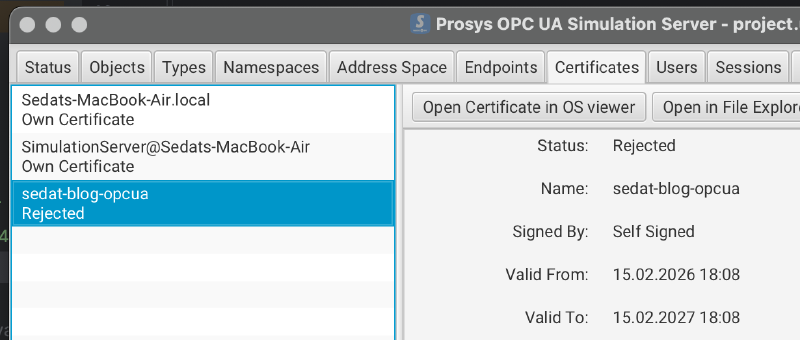
After that, you can connect with your certificate to OPC UA Server.
Conclusion #
With this approach, you can send OPC UA data directly into Kafka, SAP, REST endpoints, or any enterprise system supported by Apache Camel.
Integrating legacy industrial machines with modern IT systems doesn’t have to be expensive. With Apache Camel and PLC4X, you can bridge this gap using open-source tools.
Happy coding!