Why I am writing this blog? #
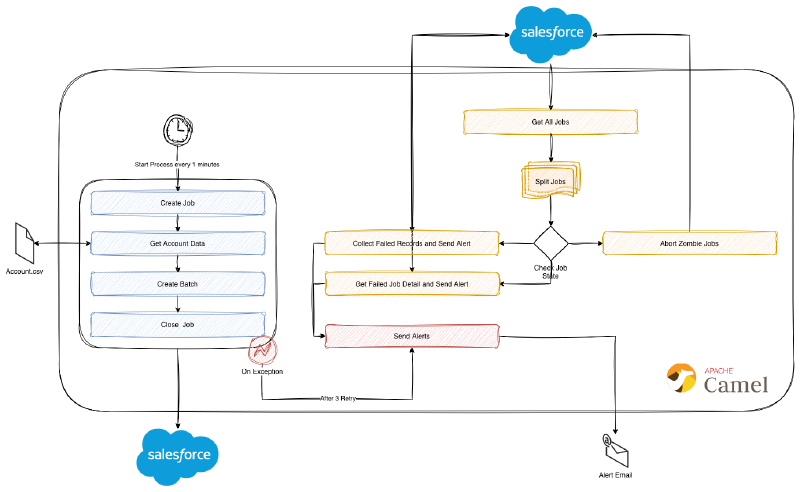
I have seen many integration projects with Salesforce. In several Salesforce integration projects I have observed that batch lifecycle management is often poorly implemented. I want to show how to upload bulk data to Salesforce via Apache Camel Salesforce component, how to handle errors and failed jobs because most of the integrations does not have proper error handling.
Why I am using Bulk API 2.0? I am using Bulk API 2.0 because with this way I can upload large amount data into the Salesforce as quickly with streamlined workflow.
For detailed explanation for Salesforce Bulk API 2.0 you can check official page https://developer.salesforce.com/docs/atlas.en-us.api_asynch.meta/api_asynch/asynch_api_intro.htm
Project prerequisites & configuration #
- Salesforce Account
- Apache Camel project
- Java 17+
- Maven
Before beginning to create this project please check official Apache Camel Salesforce page to create Salesforce Developer Org.
https://camel.apache.org/components/4.14.x/salesforce-component.html#_getting_started
If you created an app in Salesforce as successfully, create a application.properties in src/main/resources/
camel.component.salesforce.login-url=https://*******.my.salesforce.com
camel.component.salesforce.client-id=*********
camel.component.salesforce.client-secret=************
camel.component.salesforce.api-version=66.0
Also this sample CSV file can be use in this project account.csv;
Name,ShippingCity,NumberOfEmployees,AnnualRevenue,Website,Description
Lorem Ipsum,Milano,2676,912260031,https://ft.com/lacus/at.jsp,"Lorem ipsum dolor sit amet"
Posuere Inc,Bodø,141603,896852810,http://webs.com/in/faucibus/orci/luctus/et/ultrices/posuere.json,"consectetur adipiscing elit"
Angeles Urban,Aykol,197724,257060529,http://odnoklassniki.ru/sapien.aspx,"sed do eiusmod tempor incididunt ut labore et dolore magna aliqua"
Madaline Neubert Shoes,Xukou,190305,71664061,https://blogs.com/faucibus/orci/luctus/et/ultrices/posuere/cubilia.json,"Ut enim ad minim veniam"
Times Online UK,Varadero,121802,58284123,http://timesonline.co.uk/eu/magna.html,"quis nostrud exercitation ullamco laboris nisi ut aliquip ex ea commodo consequat"
The Washington Post,Hengdaohezi,190944,164329406,http://washingtonpost.com/vestibulum/proin/eu/mi/nulla/ac/enim.png,"Duis aute irure dolor in reprehenderit in voluptate velit esse cillum dolore eu fugiat nulla pariatur"
Amazon,Quintães,80285,684173825,http://amazon.co.uk/potenti/cras/in/purus/eu.png,"Excepteur sint occaecat cupidatat non proident"
This project based on the following pom.xml file.
<?xml version="1.0" encoding="UTF-8"?>
<project xmlns="http://maven.apache.org/POM/4.0.0" xmlns:xsi="http://www.w3.org/2001/XMLSchema-instance"
         xsi:schemaLocation="http://maven.apache.org/POM/4.0.0 http://maven.apache.org/maven-v4_0_0.xsd">
<modelVersion>4.0.0</modelVersion>
<groupId>io.rsg.apache.camel.learn</groupId>
<artifactId>apache-camel-salesforce-bulkapi-connectivity</artifactId>
<version>1.0-SNAPSHOT</version>

    <name>Apache Camel Salesforce Bulk API Example</name>

    <properties>
        <project.build.sourceEncoding>UTF-8</project.build.sourceEncoding>
        <project.reporting.outputEncoding>UTF-8</project.reporting.outputEncoding>
        <log4j2-version>2.25.3</log4j2-version>
        <camel.version>4.17.0</camel.version>
        <maven.compiler.release>17</maven.compiler.release>
    </properties>

<dependencyManagement>
    <dependencies>
        <dependency>
            <groupId>org.apache.camel</groupId>
            <artifactId>camel-bom</artifactId>
            <version>${camel.version}</version>
            <scope>import</scope>
            <type>pom</type>
        </dependency>
    </dependencies>
</dependencyManagement>
<dependencies>
    <dependency>
        <groupId>org.apache.camel</groupId>
        <artifactId>camel-core</artifactId>
        <version>${camel.version}</version>
    </dependency>
    <dependency>
        <groupId>org.apache.camel</groupId>
        <artifactId>camel-main</artifactId>
        <version>${camel.version}</version>
    </dependency>
    <dependency>
        <groupId>org.apache.camel</groupId>
        <artifactId>camel-salesforce</artifactId>
        <version>${camel.version}</version>
    </dependency>
    <!-- logging -->
    <dependency>
        <groupId>org.apache.logging.log4j</groupId>
        <artifactId>log4j-slf4j2-impl</artifactId>
        <version>${log4j2-version}</version>
        <scope>runtime</scope>
    </dependency>
    <dependency>
        <groupId>org.apache.logging.log4j</groupId>
        <artifactId>log4j-core</artifactId>
        <version>${log4j2-version}</version>
        <scope>runtime</scope>
    </dependency>
</dependencies>

<build>
    <defaultGoal>install</defaultGoal>
    <plugins>
        <plugin>
            <groupId>org.apache.maven.plugins</groupId>
            <artifactId>maven-compiler-plugin</artifactId>
            <version>3.10.1</version>
            <configuration>
                <release>${maven.compiler.release}</release>
            </configuration>
        </plugin>
        <plugin>
            <groupId>org.apache.maven.plugins</groupId>
            <artifactId>maven-resources-plugin</artifactId>
            <version>3.2.0</version>
            <configuration>
                <encoding>UTF-8</encoding>
            </configuration>
        </plugin>

        <plugin>
            <groupId>org.apache.camel</groupId>
            <artifactId>camel-maven-plugin</artifactId>
            <version>${camel.version}</version>
            <configuration>
                <logClasspath>true</logClasspath>
                <mainClass>io.rsg.apache.camel.learn.App</mainClass>
            </configuration>
        </plugin>

    </plugins>
</build>

</project>
Create a Job and Upload data into Salesforce #
To create a job for upload CSV data into Salesforce, we need to create a Job object. First, we need to create a Job object then set this object as exchange’s body. I created a new processor that is called AccountJobProcessor.
package io.rsg.apache.camel.learn.processors;

import org.apache.camel.Exchange;
import org.apache.camel.Processor;
import org.apache.camel.component.salesforce.api.dto.bulkv2.ContentTypeEnum;
import org.apache.camel.component.salesforce.api.dto.bulkv2.Job;
import org.apache.camel.component.salesforce.api.dto.bulkv2.LineEndingEnum;
import org.apache.camel.component.salesforce.api.dto.bulkv2.OperationEnum;

public class AccountJobProcessor implements Processor {
    @Override
    public void process(Exchange exchange) throws Exception {

        Job bulk2CreateJob = new Job();
        bulk2CreateJob.setObject("Account"); // Depends on your requirements. In this case, it should be Account
        bulk2CreateJob.setContentType(ContentTypeEnum.CSV); // In this case, it should be CSV
        bulk2CreateJob.setOperation(OperationEnum.INSERT); // In this case it should be Insert
        bulk2CreateJob.setLineEnding(LineEndingEnum.LF); // Depend on line ending of CSV

        exchange.getIn().setBody(bulk2CreateJob); // Set Job object as body
    }
}
The processor can be defined in the router but with this way this processor can be used for another routers. If you do not want to use this processor again, you can define this processor into route like this;
    from("file:./salesforce").process(new Processor() {
        public void process(Exchange exchange) throws Exception {
            Job bulk2CreateJob = new Job();
            bulk2CreateJob.setObject("Account"); // Depends on your requirements. In this case, it should be Account
            bulk2CreateJob.setContentType(ContentTypeEnum.CSV); // In this case, it should be CSV
            bulk2CreateJob.setOperation(OperationEnum.INSERT); // In this case it should be Insert
            bulk2CreateJob.setLineEnding(LineEndingEnum.LF); // Depend on line ending of CSV
            exchange.getIn().setBody(bulk2CreateJob); // Set Job object as body
       }
    }).to("salesforce:bulk2CreateJob");
After creating Job processor, we can start to create a router for bulk upload.
package io.rsg.apache.camel.learn.routers;

import io.rsg.apache.camel.learn.processors.AccountJobProcessor;
import org.apache.camel.builder.RouteBuilder;

public class SalesforceBulkAPIProducerRouterBuilder extends RouteBuilder {

    @Override
    public void configure() throws Exception {

        from("timer://readAccountCSV?fixedRate=true&period=60000") // Define a timer read files every 60 seconds.
                .process(new AccountJobProcessor()) // Create a Job for Account
                .to("salesforce:bulk2CreateJob") // Send Job object to Salesforce
                .setProperty("jobId",simple("${body.id}")) // Get JobID from Salesforce response body and set as property
                .pollEnrich("file:./salesforce?noop=true&fileName=account.csv") // Read Account.CSV
                    .toD("salesforce:bulk2CreateBatch?jobId=${exchangeProperty.jobId}") // Send Account CSV to Salesforce
                    .toD("salesforce:bulk2CloseJob?jobId=${exchangeProperty.jobId}") // Close Job in Salesforce
                    .log("${body}") // Print Salesforce Log
                .end();

    }
}
If you configured everything correctly, you will see these logs;

{
  "id": "750fj00000JFv7tAAD",
  "contentType": "CSV",
  "object": "Account",
  "apiVersion": "66.0",
  "createdById": "005fj00000DGrAXAA1",
  "createdDate": "2026-03-03T19:52:23.000+0100",
  "state": "UploadComplete",
  "concurrencyMode": "Parallel",
  "systemModstamp": "2026-03-03T19:52:23.000+0100",
  "operation": "insert"
}
Log was successful, right? #
Actually you can not be sure with this response because Salesforce’s Bulk API is working as asynchronously. So, how can we be sure job status? For this problem, we have bulk2GetAllJobs option in Salesforce component, but I want to focus error handling before create a route for get jobs details.
Let’s start to improve our router with error handling (If you are not familiar with exception in Apache Camel you can follow this link https://camel.apache.org/manual/exception-clause.html). Basically I am going to use onException in this case. Before beginning to write exception handle I want to create another route to send email to me if route faces any error.
First configure application.properties with your email configuration.
camel.email.password=*******
camel.email.username=********
camel.email.smtp.address=******
camel.email.smtp.port=******
camel.email.to.username=******
Also we need to add Apache Camel Mail dependency into pom.xml;
    <dependency>
        <groupId>org.apache.camel</groupId>
        <artifactId>camel-mail</artifactId>
        <version>${camel.version}</version>
    </dependency>
package io.rsg.apache.camel.learn.routers;
import org.apache.camel.PropertyInject;
import org.apache.camel.builder.RouteBuilder;
public class AlertRouterBuilder extends RouteBuilder {
@PropertyInject("camel.email.to.username")
private String toUsername;
@PropertyInject("camel.email.username")
private String fromUsername;
@Override
public void configure() throws Exception {
from("direct:sendAlert")
.process(exchange -> {
exchange.getIn().setHeader("To", toUsername); // Set Email-TO parameter
exchange.getIn().setHeader("From", fromUsername);// Set Email-From parameter
exchange.getIn().setHeader("Subject", "Camel Salesforce Alert!"); // Set Email Subject
//Check alert body set already by different route
if(!exchange.getProperty("messageSetByFailedJobDetailRouter", Boolean.class)){
String body = "Hello. Your Salesforce route has an error. Please check it. Message Id : "+exchange.getIn().getMessageId(); // define a message body
exchange.getIn().setBody(body); // set as body
}
})
// Mail component configuration will be different with your email provider. In this case I am using Apple email server
.to("smtp://{{camel.email.smtp.address}}:{{camel.email.smtp.port}}?" +
"username={{camel.email.username}}" +
"&password={{camel.email.password}}" +
"&mail.smtp.auth=true" +
"&mail.smtp.starttls.enable=true" +
"&mail.smtp.starttls.required=true");
}
}Then we need some changes on our Salesforce route.
package io.rsg.apache.camel.learn.routers;

import io.rsg.apache.camel.learn.processors.AccountJobProcessor;
import org.apache.camel.LoggingLevel;
import org.apache.camel.builder.RouteBuilder;

public class SalesforceBulkAPIProducerRouterBuilder extends RouteBuilder {

    @Override
    public void configure() throws Exception {

        onException(Exception.class)
                .id("Error Handler")
                .retryAttemptedLogLevel(LoggingLevel.INFO) // Set Retry Log Info.
                .redeliveryDelay(60000) // Delay between retries
                .maximumRedeliveries(3) // Maximum retry count
                .handled(true) // Set error as handled. Don't throw an exception to main route.
                .wireTap("direct:sendAlert"); // Send alert to responsible for this flow asynchronous.

        from("timer://readAccountCSV?fixedRate=true&period=60000&bridgeErrorHandler=true") // Define a timer read files every 60 seconds.
                .routeId("Salesforce Bulk Upload Route")
                .process(new AccountJobProcessor()) // Create a Job for Account
                .to("salesforce:bulk2CreateJob") // Send Job object to Salesforce
                .setProperty("jobId",simple("${body.id}")) // Get JobID from Salesforce response body and set as property
                .pollEnrich("file:./salesforce?noop=true&fileName=account.csv") // Read Account.CSV
                    .toD("salesforce:bulk2CreateBatch?jobId=${exchangeProperty.jobId}") // Send Account CSV to Salesforce
                    .toD("salesforce:bulk2CloseJob?jobId=${exchangeProperty.jobId}") // Close Job in Salesforce
                .end();

    }
}
I am using wireTap to send alert because I don’t want to block main route with email errors. Wiretap explained Apache Camel documentation : https://camel.apache.org/components/4.14.x/eips/wireTap-eip.html
With these changes, we can manage errors basically and send alert emails to recipients about the error.
What happened to our jobs in Salesforce? #
Perhaps you’re wondering what happened to the Jobs in Salesforce. To satisfy your curiosity, I want to show how to check your Job states and how to manage failed jobs.
package io.rsg.apache.camel.learn.routers;

import org.apache.camel.builder.RouteBuilder;
import java.time.OffsetDateTime;
import java.time.format.DateTimeFormatter;

public class SalesforceBulkGetAllJobsRouterBuilder extends RouteBuilder {

    @Override
    public void configure() throws Exception {

        from("timer://getAllJobs?fixedRate=true&period=10000")
                .routeId("Get All Jobs")
                .to("salesforce:bulk2GetAllJobs") // Get All Jobs from Salesforce
                .convertBodyTo(String.class) // Convert body to String to parse with jsonpath
                .split(jsonpath("$.records"))// Split response of Salesforce by records
                .toD("salesforce:bulk2GetJob?jobId=${body[id]}")
                .choice()
                    .when(simple("${body.state} == 'JobComplete' && ${body?.numberRecordsFailed} > 0")) // Check if Job status is JobComplete but has failedRecords
                        .setProperty("collectUnprocessedRecords", constant(true))
                        .to("direct:getFailedJobDetail") // Check failed Job details
                    .when(simple("${body.state} == 'Failed'")) // Check if Job status is Failed
                        .to("direct:getFailedJobDetail") // Check failed Job details
                    .when(simple("${body.state} == 'Open'"))// Check if Job status is Open
                            .choice()
                                .when(method(SalesforceBulkGetAllJobsRouterBuilder.class, "isOlderThan15Minutes(${body.createdDate})")) // Check Job is opened since 15 min
                                    .toD("salesforce:bulk2AbortJob?jobId=${body.id}") // Abort zombie Jobs in Salesforce
                            .endChoice()
                .endChoice()
                .end();

        from("direct:getFailedJobDetail")
                .routeId("Get Failed Job Detail")
                .setProperty("failedJobId",simple("${body.id}")) // Define jobId to use dynamically in the endpoints
                .toD("salesforce:bulk2GetJob?jobId=${exchangeProperty.failedJobId}") // Get status of Job by jobId
                .setProperty("jobErrorMessage", simple("${body.errorMessage}")) // Set Job Error Message property
                .toD("salesforce:bulk2GetFailedResults?jobId=${exchangeProperty.failedJobId}")  // Get failed Job details by jobId
                .setProperty("jobFailedMessage", simple("${body}")) // Set Failed Message property
                .choice()
                    .when(simple("${exchangeProperty.collectUnprocessedRecords}")) // Collect Unprocessed Records enable
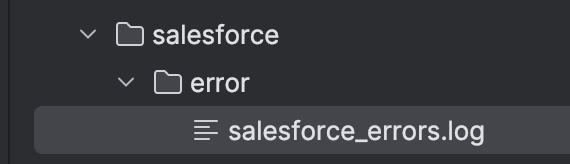
                        .to("file:./salesforce/error?fileName=salesforce_errors.log&fileExist=Append") // Append to logs files
                .endChoice()
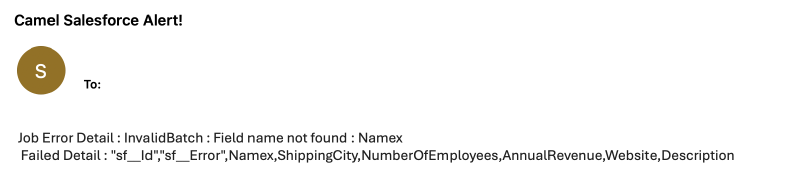
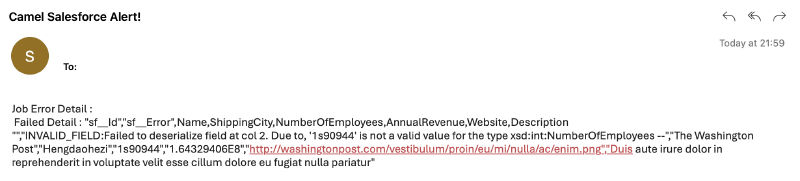
                .setBody(simple("Job Error Detail : ${exchangeProperty.jobErrorMessage} \n Failed Detail : ${exchangeProperty.jobFailedMessage}")) // Prepare the email body
                .setProperty("messageSetByFailedJobDetailRouter",constant(true)) // Define a property to use in alert route to check body is set by this router.
                .wireTap("direct:sendAlert") // Send Alert to email
                .end();

    }

    //Compare Job createdDate with current date. 15 minute just an example
    public static boolean isOlderThan15Minutes(String createdDate) {
        if (createdDate == null || createdDate.isEmpty()) return false;
        OffsetDateTime created = OffsetDateTime.parse(createdDate, DateTimeFormatter.ISO_DATE_TIME);
        return created.isBefore(OffsetDateTime.now().minusMinutes(15));
    }
}
Also, we have to see the logs in local folder.
"sf__Id","sf__Error",Name,ShippingCity,NumberOfEmployees,AnnualRevenue,Website,Description
"","INVALID_FIELD:Failed to deserialize field at col 2. Due to, '1s90944' is not a valid value for the type xsd:int:NumberOfEmployees --","The Washington Post","Hengdaohezi","1s90944","1.64329406E8","http://washingtonpost.com/vestibulum/proin/eu/mi/nulla/ac/enim.png","Duis aute irure dolor in reprehenderit in voluptate velit esse cillum dolore eu fugiat nulla pariatur"
"sf__Id","sf__Error",Name,ShippingCity,NumberOfEmployees,AnnualRevenue,Website,Description
"","INVALID_FIELD:Failed to deserialize field at col 2. Due to, '1s90944' is not a valid value for the type xsd:int:NumberOfEmployees --","The Washington Post","Hengdaohezi","1s90944","1.64329406E8","http://washingtonpost.com/vestibulum/proin/eu/mi/nulla/ac/enim.png","Duis aute irure dolor in reprehenderit in voluptate velit esse cillum dolore eu fugiat nulla pariatur"
"sf__Id","sf__Error",Name,ShippingCity,NumberOfEmployees,AnnualRevenue,Website,Description
"","INVALID_FIELD:Failed to deserialize field at col 2. Due to, '1s90944' is not a valid value for the type xsd:int:NumberOfEmployees --","The Washington Post","Hengdaohezi","1s90944","1.64329406E8","http://washingtonpost.com/vestibulum/proin/eu/mi/nulla/ac/enim.png","Duis aute irure dolor in reprehenderit in voluptate velit esse cillum dolore eu fugiat nulla pariatur"
Conclusion #
In many Salesforce projects, I have observed a lack of error management and user reporting features, which I wanted to demonstrate simply in this project. You may be able to use Salesforce screens to load 100-200 pieces of data, but the real challenge lies in seamlessly transferring thousands of pieces of information into Salesforce. With this blog, you will at least have a better understanding of what to do in the event of an error.
Happy coding!